01Getting started
Rytme is a trainer for rhythm reading and timing: you read a notated rhythm, tap it in time on a pad — and see with millisecond precision where you hit and where you drift. The app runs in landscape and completely offline.
On the very first launch, two cards greet you:
- Welcome — the idea in two sentences: read rhythm, tap in time, get honest feedback. Eight chapters build on each other; there is no streak pressure, you repeat as often as you like.
- Calibrate once? — an offer to measure your device offset (typically 40–50 ms) so it doesn't show up as your own tendency. The measurement takes about half a minute. Later is perfectly fine: practicing works right away without calibration, and you can do it any time in the settings (section 09).
02The home screen
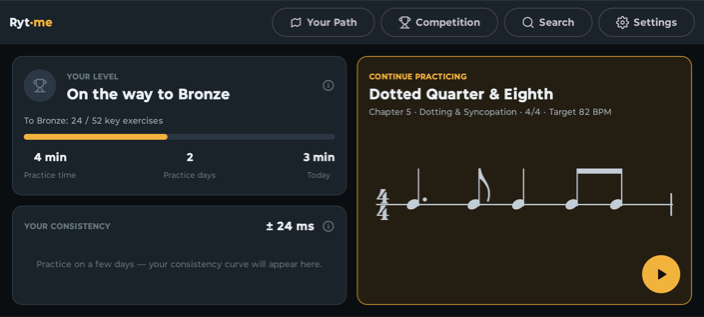
The five buttons at the top lead to Your Path, Competition, Multi-Voice, Search and Settings. Competition and Multi-Voice start out with a lock — both open once you reach chapter 3. Below, the home screen shows where you stand:
Your level (Bronze to Diamond)
The YOUR LEVEL card shows your player level with a progress bar toward the next one. The tiers — Bronze, Silver, Gold, Diamond — depend only on which single-voice rhythms you have passed; the exact rules are under Passing & levels. Tapping the card opens the in-app explanation.
The diligence mirror
At the bottom of the level card you find Practice time, Practice days and Today — a calm look back at your practice. Only time with the practice loop actually running is counted. There is deliberately no daily goal and no streak that can break.
Your consistency
The YOUR CONSISTENCY card shows, as a number and a curve, how tightly your taps scatter around the grid — per practice day, across the last 30 practice days, lower is better. Consistency is independent of any systematic early/late (your tendency), which makes it the most honest measure of your sense of rhythm. The curve appears once you have practiced on at least two days.
Continue practicing
The big card on the right is a panel with two views, switched by the two chips in its header:
- Next rhythm — jumps straight into the next open key rhythm of your current chapter (once all key rhythms are passed, into the next open one of that chapter). With chapter, time signature, target tempo and a notation preview. One tap and you're in the player.
- Multi-voice rhythms in progress · N — the shelf of multi-voice rhythms with a saved mid-run state, the most recent one on top. Each row names Voice 2 of 3, the didactic tier and when you last worked on it (today, yesterday, 5 days ago).
03Your Path
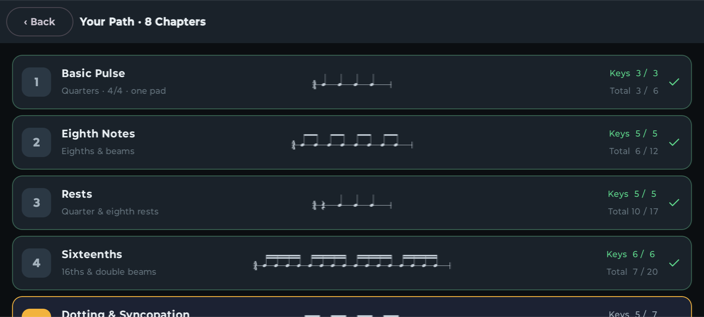
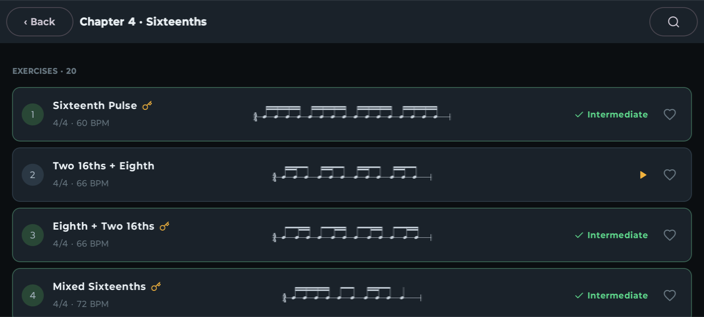
Your Path is the map of the app: 8 chapters from a steady pulse to two-pad sticking, 138 single-voice rhythms in total. Each chapter row shows name, concept, a mini-notation sample and two counters: Keys x / y and Total x / y.
Key rhythms and free practice
In every chapter, a small curated subset is marked as a key rhythm (key symbol next to the title). Only these count toward unlocking: pass all key rhythms of a chapter at least at Beginner level, and the next chapter opens. All other rhythms are free practice — they block nothing, but they do count toward your level.
- Within an unlocked chapter you choose freely; nothing has to be played in order.
- Locked chapters stay visible (dimmed with a lock); a tap explains what opens them.
- A green check mark means: all key rhythms of the chapter are passed.
The eight chapters
| Chapter | Content | Rhythms (of which key) |
|---|---|---|
| 1 · Basic Pulse | Quarters · 4/4 · one pad | 6 (3) |
| 2 · Eighth Notes | Eighths & beams | 12 (5) |
| 3 · Rests | Quarter & eighth rests | 17 (5) |
| 4 · Sixteenths | 16ths & double beams | 20 (6) |
| 5 · Dotting & Syncopation | Dotted eighths, ties, off-beats | 18 (7) |
| 6 · Triplets | Eighth, then sixteenth triplets | 20 (8) |
| 7 · Time Signatures | 3/4, 5/4, 5/8, 6/8, 7/8 with grouping | 23 (10) |
| 8 · Two Pads / Sticking | Alternating strokes & R/L under the notes | 22 (8) |
In the chapter view, each rhythm row shows position, title (with a key symbol for key rhythms), time signature and target tempo, the notation preview, the status — a green check plus the accuracy level you reached once passed — and the favorite heart. There are deliberately no stars.
04The rhythm player
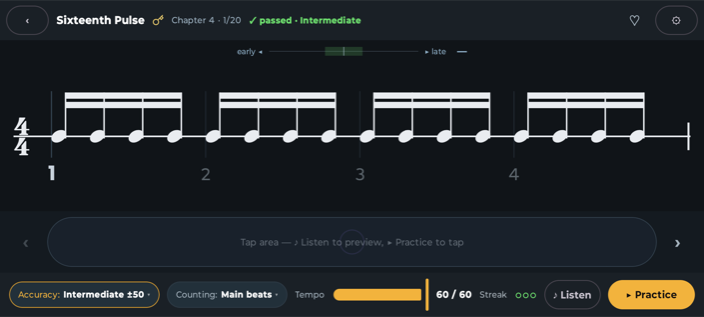
The player is the core of the app. A single-voice rhythm is exactly one bar running as a loop — notation with beat numbers on top, tap area and control bar at the bottom. Everything in this section applies to the multi-voice rhythms as well; what happens there on top of it is covered under Multi-voice rhythms.
Listen and Practice
- ♪ Listen plays the notated rhythm as a click loop — with a moving marker, no scoring. Use it to check that you've read the notation correctly.
- ▶ Practice starts the practice loop: you tap the notated notes in time on the tap area. Optionally, one bar of Count-in leads you in (settings).
The tap area
The big pill below the notation is your drum. Where you tap doesn't matter — only when. The arrows ‹ › next to it switch to the previous/next rhythm of the chapter.
In chapter 8, two tap areas labeled L and R appear automatically: the notation prescribes the hand (alternating strokes/sticking). A hit with the wrong hand gets its own marker — and makes the loop unclean. Multi-voice rhythms use two zones too, but for two attacks of the same instrument rather than two hands (section 05).
Accuracy — three tiers
| Tier | Window | Meant for |
|---|---|---|
| Beginner | ±80 ms | Getting through safely first |
| Intermediate | ±50 ms | Hitting cleanly and reliably |
| Perfectionist | ±25 ms | Mastery |
You pick the tier any time via the Accuracy chip. The windows are fixed millisecond values, independent of tempo. Switching tiers resets the current streak. For each rhythm, Rytme remembers the highest tier you have passed.
Counting, tempo, streak
- Counting switches the accompanying click between Main beats (the pulse) and Subdivisions (the finer grid).
- Tempo ranges from about half the target tempo (at least 40 BPM) up to the target. Passing only counts at target tempo — slower is explicitly allowed and is then called Practice tempo (amber): full feedback, no scoring. The target tempo follows the notation, not a difficulty score: it caps the densest spot at a playable stroke rate, so the same subdivision always comes at the same tempo and a stable inner reference can form (70–120 BPM across the catalog).
- Streak is the three circles: each filled circle is one clean loop in a row, three in a row = passed (details). An unclean loop empties the circles — the loop simply keeps running, attempts are unlimited.
The feedback
- Tendency balance (above the notation): shows live whether you average early ◀ / ▶ late — with a verdict like ✓ on beat or 12 ms too early.
- Per-note markers: every note head takes the color of your tap — blue = too early, green = inside the window, red = too late, orange = wrong hand (chapter 8), gray = missed.
- Quick diagnosis: sums up your consistency ("very steady" below ±20 ms, "fairly steady" below ±35 ms, otherwise "still shaky") and names the most conspicuous note — e.g. "Watch note 3 — it lands later than the rest."
- Per-note offset (optional): shows the ms deviation of your last tap below the note — only for early/late, or for all notes (settings).
Passed — and what that opens
The moment the third clean loop lands, the app celebrates briefly: for about two seconds stars rise behind the notation, together with ✓ Done!. Practice keeps running.
If that rhythm achieved more than itself, a card follows afterwards — one after the other, never laid over the celebration, so you never see half of both:
- Chapter complete. If those were the last open key rhythms of the chapter, the card names the chapter and lists what is newly open below it: the next chapter, the competition, the multi-voice rhythms. Every line carries a button that takes you straight there — nothing to go looking for.
- New level. If the same rhythm lifted you past a level threshold, a second card follows with the medal and how far it is to the next level.

While a card is up, practice pauses — the metronome does not keep ticking behind the message. Keep practicing closes it and you are back in the exercise. If you jump away with one of the buttons instead, what you achieved is recorded all the same.
05Multi-voice rhythms
Behind the Multi-Voice button lies the second shelf: 84 multi-voice rhythms — drum-kit patterns of 2 to 4 voices over a shared cycle of one or two bars. You play them voice by voice: what you already own keeps playing back while you add the next voice on top. In the end the full groove runs — and you tapped every voice of it yourself.
The shelf opens at chapter 3. After that everything in it is freely selectable: it is a play mode, not a second learning path, and nothing has to be played in order.

The eight didactic tiers
The rhythms are sorted into tiers that build on each other — each with a name, a short description and the counter Passed x / y. Tapping a tier opens its list.
| Tier | What it is about | Rhythms |
|---|---|---|
| Basic Beat | All voices on the eighth-note grid, onsets complement each other | 10 |
| Pulse & Off-Beat | Onsets between the beats while one voice holds the pulse | 10 |
| 16ths & Ghost Notes | Sixteenth-note grid plus onsets with almost no accent | 10 |
| Shuffle & Triplet Feel | The beat divides in three — the eighth-note pair becomes long-short | 14 |
| Articulation | The second attack forms its own pattern against the first | 10 |
| Accent Displacement | Accent groups against the bar — the counting tips, the grid stays | 10 |
| Clave & Latin | An asymmetric pattern across two bars anchors all voices | 10 |
| Polyrhythm | Two subdivisions or metres at once within one cycle | 10 |
Inside a tier, every row shows the title, time signature with bar count and target tempo (e.g. 4/4 × 2 · 84 BPM), a preview of all voices as dot lanes, the accuracy tier you reached and the favorite heart.
How a run works
- Listen plays the whole rhythm with all voices — no scoring. So you know where you are heading.
- Tap the first voice: it stands as a large staff line with the moving marker, the tap area below. Scoring is the same as in the rhythm player — 3 clean loops in a row, at target tempo, in the accuracy tier you chose.
- Voice passed: a short celebration, without stopping the loop. The voice moves up as a mini lane and is audible as a real instrument from the next round on. The next staff line appears right away — its first round is a reading/listening loop, your taps don't count there yet.
- All voices standing: the full groove runs, big celebration, the result is saved.
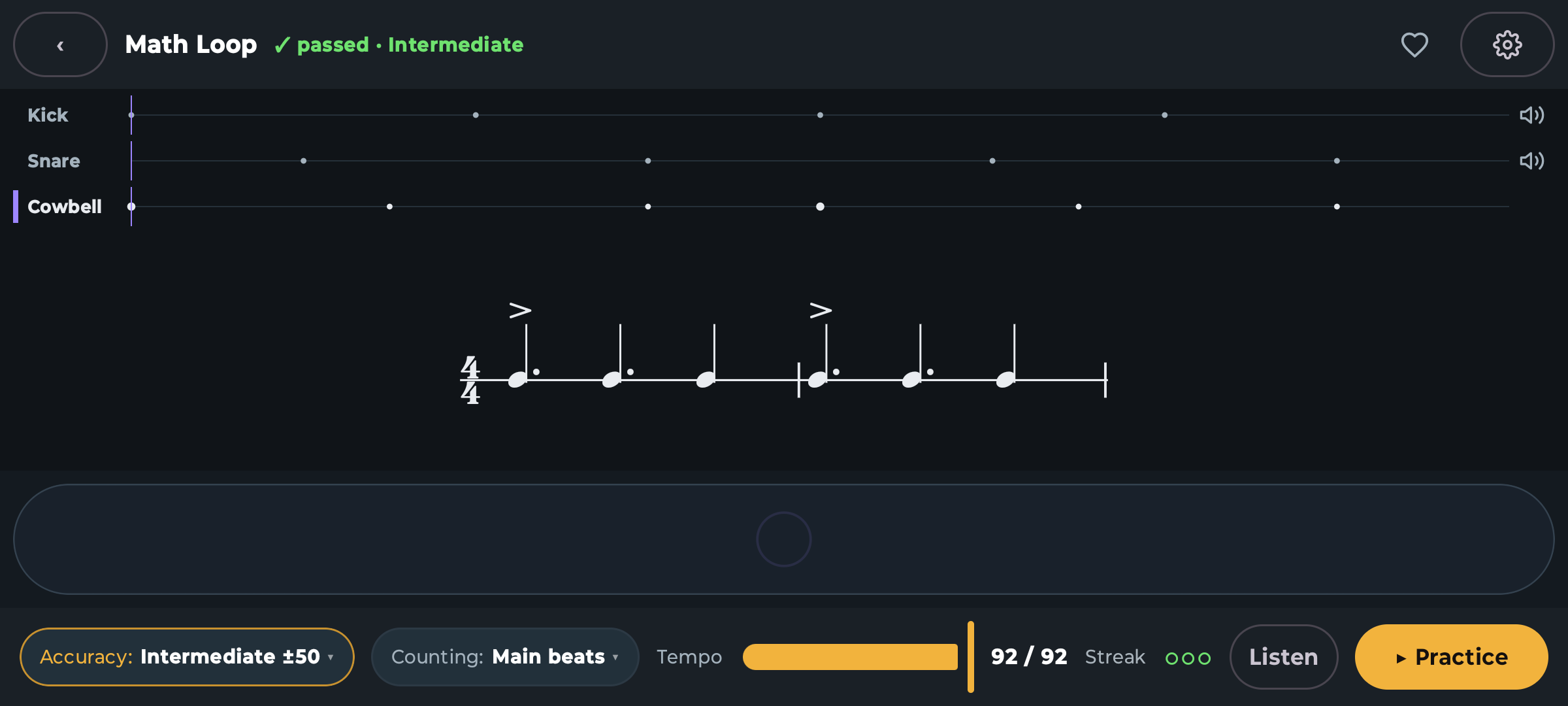
The click keeps running as long as there is something to tap — and falls silent by itself once all voices stand: from then on the groove carries itself. Every mini lane has a mute toggle; use it to isolate single voices, in Listen too.
Two zones: articulation instead of hand
Some voices carry two attacks of the same instrument. The tap area then splits into two zones, each with a plain-text label next to its note-head symbol:
- Closed hihat / Open hihat
- Snare center / Snare rimshot
- Ride bow / Ride bell
In the notation the note head tells the two zones apart. Unlike sticking in chapter 8 this is not about the hand but about the sound — both zones are scored. On top of that come three accent levels: ghost (bracketed head, almost unaccented), normal and accent (>) — and you hear the difference.
The instruments in the catalog: kick, snare (with rimshot), hihat (open/closed), ride (bow/bell), clave, cowbell, shaker and two toms.
Mid-run state: you can stop any time
As soon as you pass a voice, Rytme remembers where you are — separately per accuracy tier. Next time you open the rhythm it continues exactly there, and every started rhythm is listed on the home screen under Multi-voice rhythms in progress. Switch the accuracy tier and that tier starts with its own mid-run state.

06Reading notation
Rytme shows real music notation (engraved with a professional notation font), reduced to what matters for rhythm reading: one line per voice, clear beam groups. Single-voice rhythms are exactly one bar; multi-voice ones run over one or two bars, and then a bar line sits in the staff with the time signature stated once at the front.
The learning scaffold
Below the bar sit beat numbers (1 2 3 4 …), and thin guide lines mark the beats. This learning scaffold can be switched off in the settings once you want to read "bare".
What you will meet
- Note values from whole notes down to sixteenths, grouped with beams and double beams.
- Rests (quarter and eighth rests from chapter 3).
- Dotting and ties (chapter 5) — a tie binds two notes into one sound: only the first head is tapped.
- Triplets (chapter 6) — three even notes in the space of two, marked with a bracket and the digit 3.
- Time signatures 4/4, 3/4, 5/4, 5/8, 6/8 and 7/8 (chapter 7) — in 7/8 the beam grouping shows how to count (e.g. 2+2+3).
- Sticking (chapter 8) — R/L denotes the hand; accents ask for an emphasized stroke.
- Two attacks (multi-voice rhythms) — the note head tells the two zones of a voice apart, e.g. closed versus open hihat.
- Accent levels (multi-voice rhythms) — > above the note for the accent, a bracketed note head for the almost unaccented ghost note.
You see the notation of every rhythm in the list and in the player — and ♪ Listen resp. Listen lets you hear it any time before you practice for scoring.
07Passing & levels
What is a clean loop?
A loop (one pass through the cycle) counts as clean when all three conditions hold:
- At least 85 % of the notes land inside the window of your chosen accuracy tier,
- you stay within the stray-tap budget: at most 15 % extra taps — for short rhythms (up to 6 notes) the budget is zero, any extra tap disqualifies,
- with two zones the assignment is right — the sticking (no wrong hand) resp. the correct attack.
A rhythm is passed after 3 clean loops in a row — at target tempo, in the chosen tier. The player then permanently shows ✓ passed · tier. For each rhythm, the highest tier ever passed counts; mastery means: passed at Perfectionist (±25 ms). For multi-voice rhythms the same rule applies per voice; the whole rhythm is done once every voice stands.
The scoring windows
| Verdict | Deviation |
|---|---|
| Perfect | up to ±25 ms |
| Good | up to ±50 ms |
| OK | up to ±80 ms |
| Miss | beyond ±80 ms |
The windows are fixed ms values — independent of tempo. In fast rhythms the notes move closer together, so the same window becomes musically stricter. Scoring always uses the calibrated deviation: the measured device offset is already subtracted (Calibration).
The player levels
| Level | Condition |
|---|---|
| Bronze | 14 of 138 rhythms passed (one tenth) |
| Silver | 46 of 138 (one third) |
| Gold | 92 of 138 (two thirds) |
| Diamond | All 138 single-voice rhythms passed |
"Passed" here means: at least at Beginner. Every rhythm you pass counts — key rhythm or free practice alike. The key rhythms open the chapters (Your Path), but they carry no extra weight toward your level. Only the single-voice rhythms are counted — the multi-voice ones are a play mode and stay out of it. The thresholds are shares of the catalog: when new rhythms join, they grow along. A level, once reached, is permanent — it is never downgraded.
You learn about the step up the moment it happens: the player shows it as its own card right after the celebration (The rhythm player). Because only the change is reported, a level you merely keep does not raise the card again.

Tendency and consistency
Rytme distinguishes two things that feel very different while practicing:
- Tendency — you are systematically early or late. That is fixable: often it's device latency (calibrate!), the rest is habit.
- Consistency — how tightly your taps scatter. That is the actual sense of rhythm and improves only through practice. This is exactly what the curve on the home screen records — per practice day, so you can see real progress.
08Competition
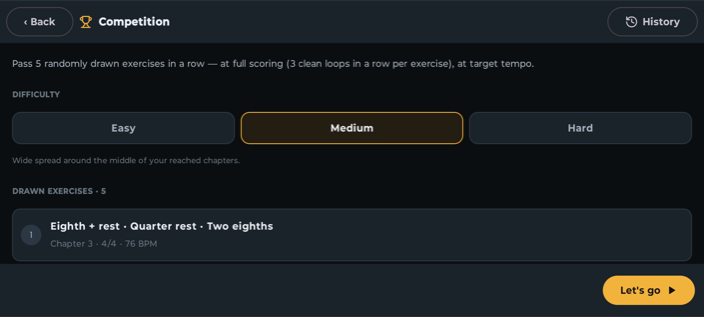
Competition is the acid test: pass 5 randomly drawn rhythms in a row — at full scoring (3 clean loops in a row per rhythm) and at target tempo. It opens once you have reached chapter 3.
The rules
- Rhythms are drawn from your unlocked chapters, starting at chapter 2 (chapter 1 is excluded), five distinct single-voice rhythms — multi-voice ones never appear in the competition. Before starting you can Redraw.
- During a run there is no preview, no tempo throttling and no skipping — just you and the notation.
- The accuracy tier is the tap accuracy you last chose, and it stays fixed for the whole run.
- In the competition, too, every rhythm you pass counts toward chapters and levels. The run is not interrupted for it: if a chapter gate falls along the way or you reach a new level, the message is waiting on the results screen at the end.
Difficulty
Easy, Medium and Hard control which chapters the draw favors — easy favors lower ones, hard favors higher ones, medium spreads widely around the middle of your reached chapters. It is a preference, not an exclusion — and it does not change how strictly you are scored.
History and best results
Every finished run lands in the History (local, the last 50): with date, difficulty, tier and total time — and per rhythm, reported separately: understanding (from the notation appearing to your first practice start) and playing (until passed), plus tendency, consistency, loop count and the most conspicuous note. The best result is kept per difficulty: highest tier, ties broken by shortest time. Everything stays on your device — there is no online ranking.
09Calibration
Why calibrate?
Every device outputs the click with a delay and reports your tap with a delay — together typically 40–50 ms. Without compensation it would look like you tap systematically off. This constant offset can be measured once and is then subtracted from every score. (What cannot be subtracted is fluctuation — which is why you should use the speaker rather than Bluetooth.)
Calibration is optional: without a measurement, Rytme assumes an offset of 0. For the Beginner window (±80 ms) that works fine; at Perfectionist level the measurement really pays off.
The main method: off-beat tapping
- Settings → Calibration → Off-beat tap.
- The app asks once for microphone permission — the microphone only listens to the device's own speaker click and your tap.
- A metronome clicks (default 80 BPM), a silent bar guide shows the midpoint between two clicks — the "and".
- Tap exactly on that "and", about 8–12 times, firmly and evenly. Then your offset is set: Calibrated: X ms.
If a measurement fails (too shaky, too few clean taps), nothing is saved — an existing calibration is kept. Just repeat: tap more firmly and more precisely on the "and".
Alternatives
- Play back the rhythm — three short listen-and-repeat exercises instead of off-beat tapping.
- Set manually — enter the offset by hand, e.g. for Bluetooth, where the microphone measurement cannot work.
10Search & favorites
The Search magnifier searches both shelves at once — single-voice and multi-voice rhythms. Free text runs across title and concept, so "syncopation" also finds what the app marks as Off-Beat.

Always visible are the filters for type (Single-Voice / Multi-Voice), status (open / passed / locked) and Favorites. Behind more filters sit two further axes — the number next to it tells you how many of them are currently set:
- Concept — the content marks of both catalogs: basic pulse, eighths, sixteenths, triplets, rests, dotted notes, off-beat, meter & grouping, articulation, accents, polyrhythm, clave and Groove (the recurring accompaniment pattern on the kit — only multi-voice rhythms carry that mark).
- Time signature — 4/4, 3/4, 7/8 and the rest.
Every result row names its type, where it comes from (chapter for single-voice, the didactic tier for multi-voice), the time signature with bar count and the target tempo. Still-locked hits stay visible and carry their condition in the row (unlocks after ch. 4); a tap leads into the chapter that opens them. Reset clears all filters at once.
The heart ♥ lives in the player and on every rhythm row: use it to mark what you want to revisit regularly — from both shelves — and filter it out here with one tap.
11Settings
Playing
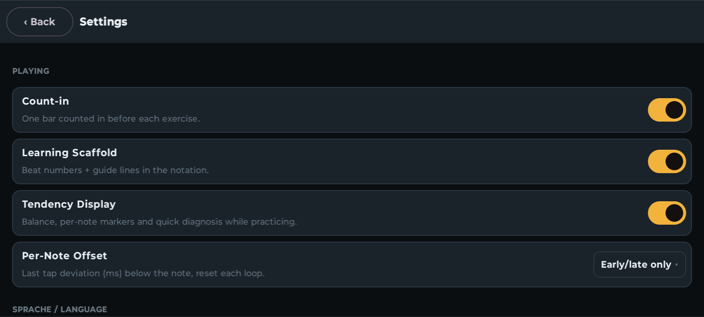
- Count-in — one bar counted in before each rhythm.
- Learning Scaffold — beat numbers and guide lines in the notation.
- Tendency Display — balance, per-note markers and quick diagnosis while practicing.
- Per-Note Offset — ms deviation of the last tap below the note: Off / Early-late only / All notes.
Calibration
Calibration status plus the three methods Off-beat tap, Play back the rhythm and Set manually — details under Calibration.
Language
System / Deutsch / English — takes effect immediately, no restart.
Diagnostics / developer
Three labs (Notation Lab, Timing Lab, Loopback Lab) for measuring and inspecting engraving and device timing. They are not part of the training — but curious looks do no harm.
12Data & privacy
- Rytme has no internet permission — the app technically cannot send anything. Progress, favorites, history and calibration live exclusively on your device.
- No account, no tracking, no ads, no in-app purchases.
- The only optional permission is the microphone — solely for loopback calibration; the signal is processed transiently on-device and never stored.
- Rytme uses Android's own automatic backup: the system may save your app data (progress, favorites, calibration) to your Google account and restore it when you reinstall or move to a new device. That is a feature of Android, not of Rytme — you can turn it off in the Android settings under Backup. Otherwise: uninstall the app and the local data is gone.
You'll find the formal privacy policy for the app at rytme.net/datenschutz-app — deliberately kept separate from the website's policy.
13FAQ
What is the difference between rhythm, voice and groove?
A rhythm is anything in the catalog: one cycle with one or more voices. A voice is one staff line that you tap in one go — single-voice rhythms have exactly one, multi-voice ones have two to four. Groove is no longer an umbrella term but a concept mark in the search: the recurring accompaniment pattern on the kit, as opposed to a study.
Do multi-voice rhythms count toward my level?
No. Level, chapter gates and competition depend solely on the 138 single-voice rhythms of Your Path. The multi-voice ones keep their own progress per tier (Passed x / y).
Do I have to finish a multi-voice rhythm in one sitting?
No. Every voice you pass is saved — separately per accuracy tier. Next time it continues right there; started rhythms are listed on the home screen under Multi-voice rhythms in progress.
The app says "too late", but I feel right on the beat.
Very likely device latency: click output and touch reporting together typically cost 40–50 ms. Calibrate once — afterwards the tendency balance shows your real timing.
Why doesn't my streak fill up?
Four common reasons: you are below 85 % hits in the chosen tier; you have too many extra taps (in short rhythms a single one disqualifies); you practice below target tempo (amber Practice tempo — feedback yes, scoring no); or you switched the accuracy tier mid-run — that resets the streak.
Can I practice with Bluetooth headphones?
For serious practice: no. Wireless audio delays the click — and it fluctuates, so it cannot be subtracted. The player warns you. Use the speaker or wired headphones; for wireless the best you can do is Set manually.
Do I lose progress or my level when I take a break?
No. There are no streaks, no expiring goals, and a level once reached is never downgraded. The diligence mirror only looks back, it never threatens.
What does the "± N ms" number on the home screen mean?
Your consistency: how tightly your taps scattered around the grid on that practice day. Lower is better — and the trend across days is your most honest measure of progress.
I accidentally double-tapped — is everything ruined?
Lightning-fast double-taps (below ~60 ms on the same zone) are filtered out as bounce. A real extra tap counts against the stray-tap budget — longer rhythms forgive a slip.